GlideRail vs Spiky: Live Cues on a Sales Call, Compared
Updated 2026-11-10 · 5 min read · Competitor facts last checked 2026-11-10
Short answer: Spiky records and analyzes sales calls, and its Whisper desktop app shows battlecards and AI help during a live call, with per-user plans built for teams. GlideRail is a conversation rail for one person on a Mac: your prep sits on cards, and it offers the card you wrote when someone on the call says words from it, with the audio kept on your Mac. If you want call recordings, coaching and CRM updates, look at Spiky. If you sell on your own calls and want only your own words in front of you, that's GlideRail's job.
If you sell on your own video calls, both Spiky's Whisper app and GlideRail can put a card in front of you when the buyer says a word you planned for, and neither sends a bot into the call. Spiky also records the call, coaches you on it and updates your CRM. GlideRail does none of that, and the audio never leaves your Mac.
First, the bias: I created GlideRail
Every Spiky fact below comes from Spiky's own pages: its homepage, pricing page, FAQ, the Whisper page and its help center (Whisper, battlecards), checked on November 10, 2026. I haven't tested Spiky hands-on. Where its pages don't cover something, I write "not stated".
Where Spiky wins
Recordings and coaching. Spiky records calls, writes transcripts and summaries, tracks keywords and gives coaching feedback, and a manager can see it across a team. GlideRail has no recordings, no reports and no manager view.
It updates your CRM. Spiky's product page lists Salesforce, HubSpot, Pipedrive and Zoho, and says its agent automates CRM updates. GlideRail doesn't connect to a CRM.
It can help with what you didn't prepare. Whisper's help center describes Ask Scribe, where you ask a question mid-call and get an answer from the call so far. GlideRail only shows what you wrote, so a question you never prepared for gets nothing from it.
More places to use it. Whisper runs on macOS 12 or later and Windows 10 or later, with Zoom, Google Meet, Teams and Slack huddles. Its help center says desktop audio covers calls without a meeting link, like a dialer or an in-person conversation. GlideRail is Mac only.
A free plan and a full trial. Spiky's pricing page lists a free plan with 3 meetings per user, and a free trial with no card that includes Premium's features (CRM aside), battlecards among them.
Compliance paperwork. Its homepage says it's SOC 2 Type II certified, GDPR compliant and runs on ISO 27001 infrastructure. GlideRail has no certification.
Side by side
| Spiky | GlideRail | |
|---|---|---|
| What it is | Call recording, coaching and live guidance for sales | A conversation rail |
| Plans | Per user, from Free to Enterprise | One person; no seats |
| Shows a card when a word comes up | Battlecards in Whisper (Premium) | Live Rail offers the card you wrote (Pro, Apple Silicon) |
| Who writes the cards and triggers | An admin user, up to 5 keywords a card | You, by writing the card: it matches each card's heading and distinctive words |
| Answers you didn't write | Ask Scribe, when you ask | None, by design |
| Records the call | Yes, with transcripts and summaries | No |
| Where the audio goes | Whisper uploads to Spiky's web platform after you stop; how long it's kept is not stated | Stays on your Mac; never saved or sent |
| Price | Free plan; Premium listed at $40 or $49 a user a month | Free version; Pro $99 a year or $19.99 a month |
| Hidden from screen sharing | Not stated on its pages | Yes (Pro) |
| Runs on | macOS 12+, Windows 10+ | macOS 14+; voice features need Apple Silicon |
On price: Spiky's pricing page shows two figures for each paid plan beside a monthly and annual switch (Premium $40 or $49 a user a month) and doesn't label which is which. Its cheaper Plus and Pro plans don't list battlecards. Check the page before you buy.
On hiding: GlideRail's windows stay out of Zoom, Google Meet, Teams, Loom, OBS and QuickTime when invisibility is on. In Zoom, set screen capture to Advanced capture with window filtering, as the Zoom guide shows.
Where GlideRail fits better: only your words on screen
Spiky's battlecards carry a recommended line your team wrote, and Ask Scribe writes an answer when you ask it. GlideRail has no generative AI, so nothing on screen was written by anyone but you. Cue Mode (Pro) turns your prep into cards you jump between in any order, and Live Rail (Pro, Apple Silicon) offers the card that matches what the buyer just said, in a small chip. One click, or ⌘Return, jumps to it. It never moves on its own.
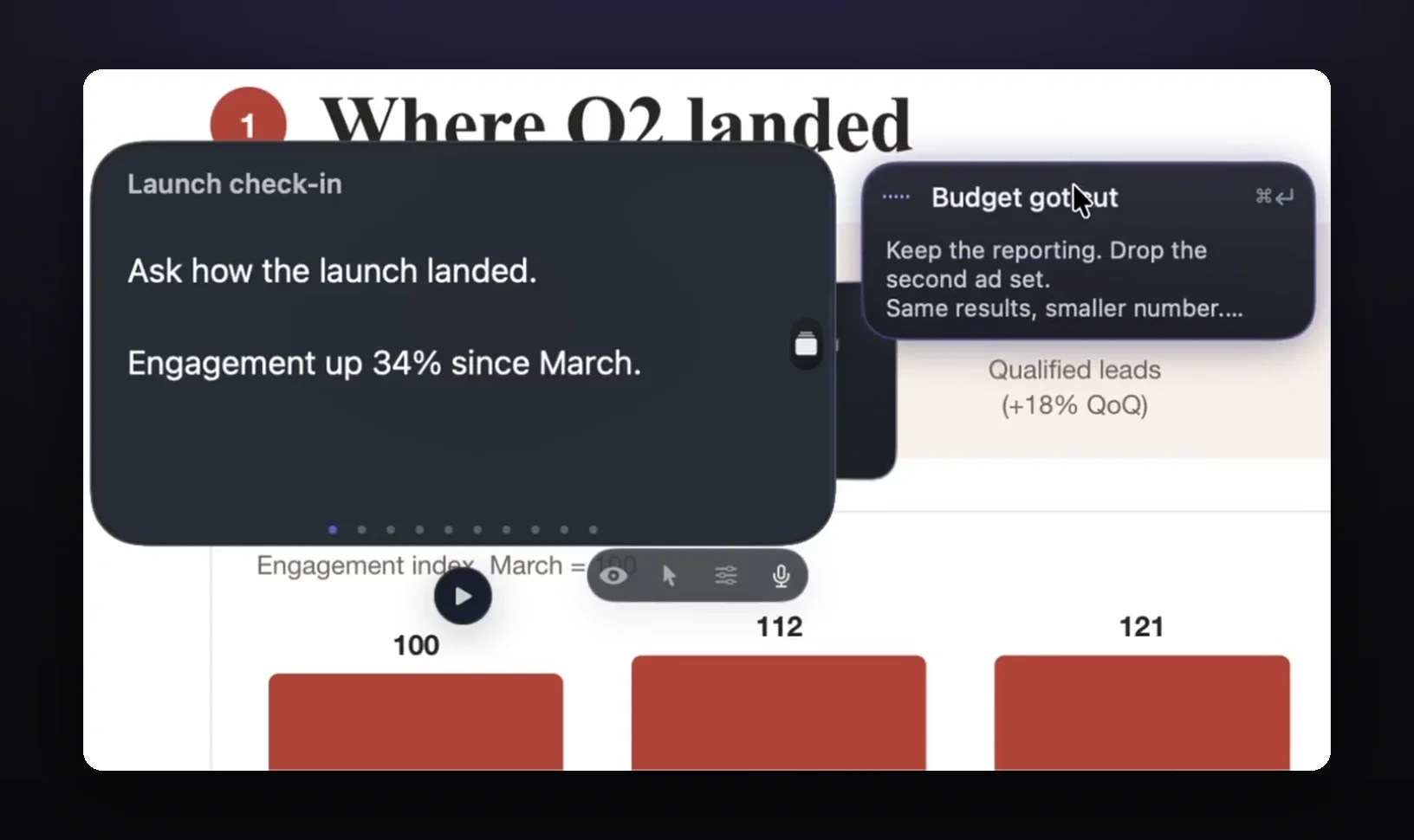
Here's what that looks like on a call. You wrote a card headed "Budget got cut" with your answer under it. Halfway through your pitch, the buyer says their budget got cut this quarter. The chip offers that card, you press ⌘Return, and your own answer is on screen. If the buyer had said "we're out of money" instead, nothing would come up: it matches words, not meaning, so the words on your cards decide how well it works.
Where GlideRail fits better: nothing records the call
Spiky's homepage leads with "Capture every sales conversation", and its help center says Whisper's upload and analysis continue on Spiky's web platform after you stop. Its FAQ says an automatic notice is sent before the meeting. GlideRail doesn't record. It recognizes speech on your Mac, and the audio is never saved or sent.
Where GlideRail fits better: one person, no admin
Spiky's battlecards are created by admin users, with up to 5 keywords each, so a solo seller sets themselves up as the admin on a Premium seat. In GlideRail you write one card per section of your prep, and the headings and distinctive words do the matching. There's no account to create.
The flaws on our side
- It costs money. Live Rail, Cue Mode and hiding need Pro. The free version gives you documents, imports and floating windows anywhere on your screen, but they show in screen shares.
- Mac only, and voice needs Apple Silicon. Live Rail won't start on an Intel Mac.
- Everything in "Where Spiky wins" above: no recordings, coaching, CRM or Windows.
Verdict
Pick Spiky if you want call recordings, coaching, CRM updates and answers on demand in one place, you manage a team, or you need Windows.
Pick GlideRail if you're the one on the call, on a Mac, and you want your own prep to come up when the buyer turns the conversation, with nothing recorded. GlideRail is free to download, and the 7-day Pro trial needs no card, so spend it on a real call.
FAQ
Is GlideRail a Spiky alternative?
For one seller on a Mac who wants their own cards at the right moment, yes, with the difference that GlideRail never writes answers or records the call. For recordings, coaching and CRM updates, no: Spiky does those and GlideRail doesn't.
Does Spiky send a bot into my Zoom call?
Its Whisper desktop app doesn't: the Whisper page says "No bot joins your calls", and its help center describes a Whisper Only Mode where the Spiky bot never joins calendar meetings. Spiky's FAQ says that when a bot does join, it detects the participants' names.
How much does Spiky cost?
Its pricing page lists a free plan with 3 meetings per user, paid plans per user a month, and Enterprise on request. Battlecards are listed on Premium. GlideRail Pro is $19.99 a month or $99 a year, with a free version.
Does GlideRail work on Windows?
No. GlideRail is a Mac app. Spiky's Whisper runs on Mac and Windows.
Written by Takumi, who created GlideRail. Spiky facts checked November 10, 2026.