How to Prepare for a Discovery Call in 10 Minutes
Published 2026-11-16 · 7 min read
You can prepare for a discovery call in 10 minutes. Find out what they do, guess why they booked, pick five questions, write one line on what you sell, and decide the next step you want. Set a timer and use this order. If the call's in an hour, you have time.
| Minutes | Do this | Write down |
|---|---|---|
| 0 to 3 | Read their site and their booking form | One line on what they do |
| 3 to 4 | Guess why they booked | One line: "They probably want [outcome]" |
| 4 to 7 | Pick five questions | Five questions, in your own words |
| 7 to 8 | Write what you do | One sentence, plus one real result |
| 8 to 10 | Choose your next step | What you'll ask for, and two times you can offer |
Keep all of that on one page. No real result yet? Write the one problem you solve and how you'd measure it, like "fewer no-shows a week", and use that line instead.
One disclosure: I created GlideRail, a conversation rail for Mac whose windows are invisible to screen capture. It comes up near the end, as one way to keep that page in view. The plan works on paper.
- The five questions to pick
- What should you research before a discovery call?
- How should a discovery call run?
- What not to do in the last hour
- Keep your page in view on the call
- Which setup should you pick?
The five questions to pick
Pick one question from each of five jobs: why now, how it works today, what it costs them, what they've tried, and who decides. Five is enough to prepare, because good follow-ups come from their answers. Gong's review of 519,000 recorded discovery calls found that 11 to 14 questions over a call correlated with the best results, spread out instead of front-loaded (Gong's discovery call data).
Copy these and change the words until they sound like you:
- Why now: "What made this worth a call this month?"
- How it works today: "Walk me through the last time you did [task]."
- What it costs: "What does that cost you in a month, in time or money?"
- What they've tried: "What have you tried so far, and what made you stop?"
- Who decides: "Who else wants this fixed, and who signs off?"
The same Gong post found that the most effective discovery calls uncover three or four business problems. So when an answer gets interesting, stay there. For a longer list, the sales discovery call rail has nine sets of questions you can copy.
What should you research before a discovery call?
Research three things before a discovery call: what the company sells, who booked and what they do there, and anything they told you when they booked. Their booking form is the most useful page you'll read, because they wrote it. Three minutes is plenty. You're looking for one specific thing to mention, not writing a report.
Then check who's coming: their role, from their public profile. If there was no booking form, reply to the calendar invite and ask, "What would make this call worth your time?" Their answer does the same job.
Last, write down the one answer that would mean you can't help them, like a budget far below your smallest project or a job you don't do. If you hear it, say so kindly and offer a name if you have one.
A good first line shows you did this: "I saw you just started selling to [customer type]. Is that why this came up now?" If you're wrong, they'll correct you, and that gets them talking.
How should a discovery call run?
A 30-minute discovery call runs in four parts: a short open and agenda, then most of the time on their problem, a recap, and the next step. You talk least in the middle. Save your pitch for after the recap, because until then you don't know which part of what you sell matters to them.
| Part | Minutes | Your job |
|---|---|---|
| Open and agenda | 2 | Say the end time, ask why they booked |
| Their problem | 20 | Ask, listen, write down their words |
| Recap | 3 | Say it back, and ask if you got it right |
| Next step | 5 | Book it before you hang up |
If they ask "how much?" before you know the job, give a range for work like theirs and say it depends on scope: "Projects like this usually run between [low] and [high]. Can I ask two questions so I can narrow that down?" For the next step, offer two times instead of asking when suits them: "Does Thursday at 2 or Friday at 10 work for the follow-up?"
For the words to use at each step, the sales call script has a template, and notes for sales calls covers keeping it to hand.
What not to do in the last hour
Don't build a deck, and don't write a full script. A deck pulls you into presenting, and on a discovery call you're there to listen. A script gets read, and people can hear it. And don't look up ten competitors. If they ask about one, "I don't know them well, what do you like about them?" is a fine answer.
Do check the boring things: your link works, your camera's on, your microphone's the right one, and your desk is clear of anything you wouldn't want on screen.
Keep your page in view on the call
Your one page only helps if you can read it without looking away. A printed sheet taped under your camera costs nothing, and a narrow doc at the top of your screen works as long as you don't share your whole screen. If you do share, the doc goes out with everything else.
GlideRail keeps what you prepared on your side of the screen. Paste your five questions in, each under a # heading, and press Split into sections. Cue Mode (Pro) shows one card at a time, and ⌘[ and ⌘] change cards from any app while Cue Mode is open. Invisible (Pro) keeps the cards out of the share and the recording. On Zoom, set Screen capture mode to "Advanced capture with window filtering" first, as this Zoom guide shows.
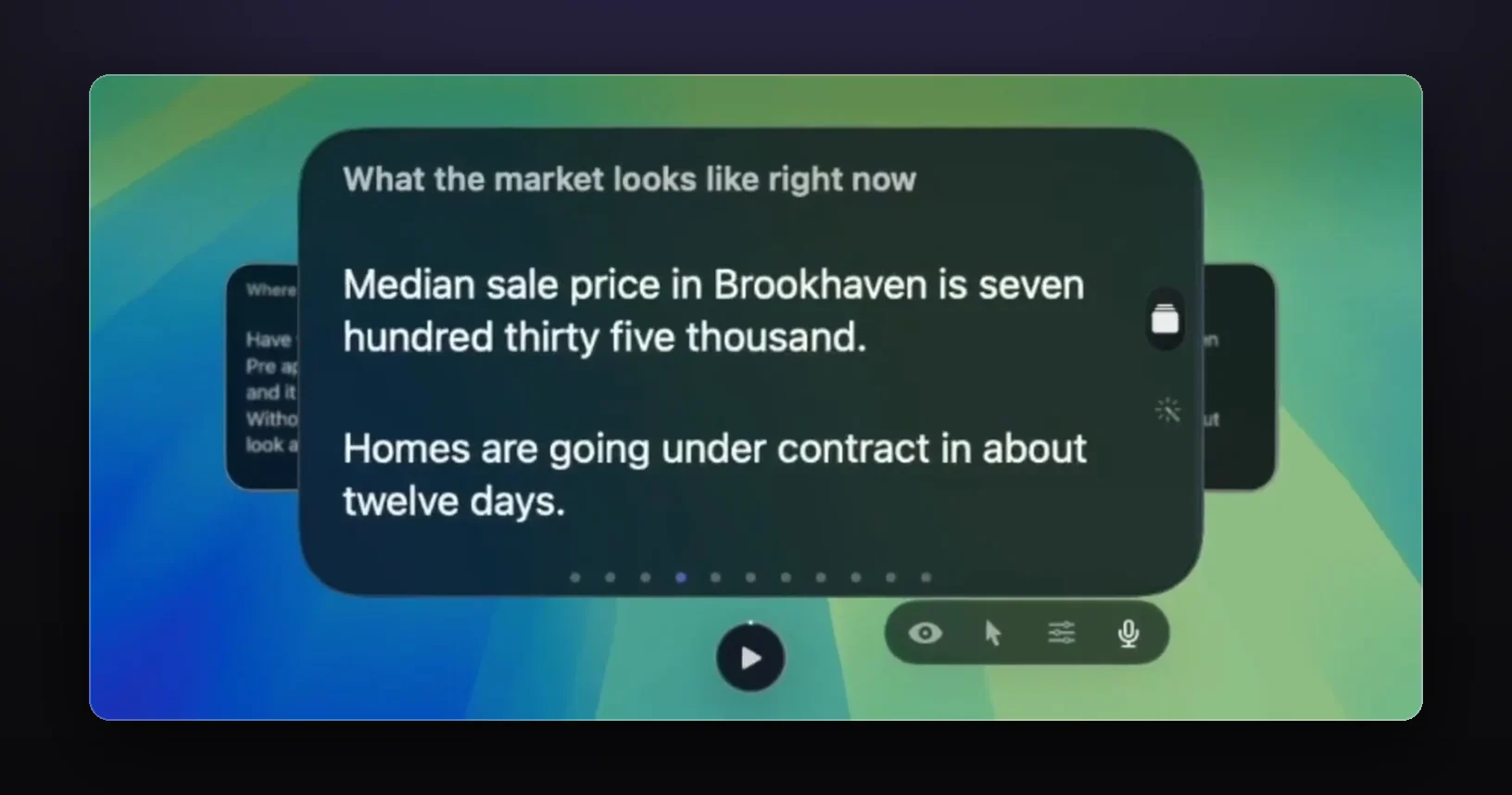
Discovery calls rarely run in your order, and that's what Live Rail (Pro, Apple Silicon Macs) is for. It listens on your Mac, and when someone says words that match a card, it offers that card in a small chip. One click or ⌘↩ opens it, and it never changes cards by itself. It matches words, not meaning, so it can miss. No audio leaves your Mac.
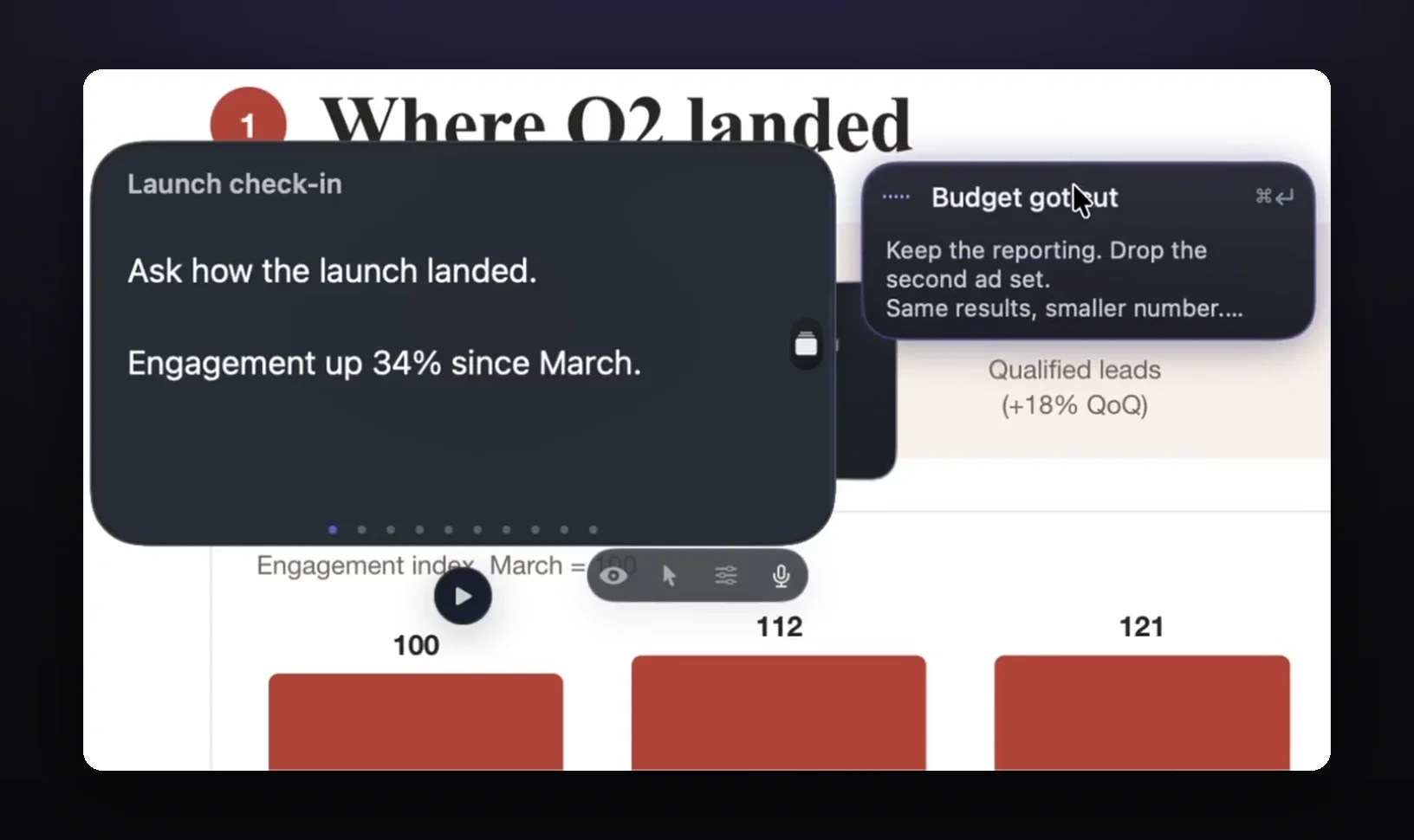
Nothing in GlideRail writes your questions or answers. A phone camera pointed at your screen sees your cards, and on the free version your windows show in a share.
Which setup should you pick?
If you take a discovery call or two a month, use paper. Don't pay anyone. If you run them weekly without sharing your screen, a doc works, and GlideRail's free version covers that. If you run them weekly and share your screen, you need something that stays out of the share, and that's the case GlideRail Pro is for.
FAQ
How long should you prepare for a discovery call?
Ten minutes is enough for most calls with small companies. Spend longer on a big account, mostly on who's coming and what they've said in public. For a small inbound lead, I'd stop at about 30 minutes; more prep rarely changes the call.
What should I bring to a discovery call?
One page: what they do, why you think they booked, five questions, one sentence on what you do, one real result, and your next step with two times. Add their number once they give it. You don't need a deck.
How many questions should I ask on a discovery call?
Prepare five and expect to ask more as follow-ups. Gong's review of 519,000 calls linked 11 to 14 questions over the call with the best results, and the best calls stayed on three or four problems.
What's the difference between a discovery call and a sales call?
A discovery call is the first real talk, where you find out if there's a problem worth solving. A sales call comes after, when you show your answer and talk price. On a small sale they can be one call, so keep the recap in the middle.
Does GlideRail write my discovery questions?
No. It shows what you wrote, and it adds nothing of its own. On a live call, Live Rail only offers your own cards when the words match. No audio is saved or sent anywhere.
Try it on one call
Download GlideRail free, paste your page in, and press Split into sections. Every download comes with a 7-day free Pro trial, so you can run Cue Mode on a real call, and if you buy later there's a 30-day money-back guarantee. Do your 10 minutes, and when the call goes sideways, your next question will already be on your screen.
Written by Takumi, maker of GlideRail. Last updated November 16, 2026.